AWS Break Glass Access: The Complete Guide
This blog explores the Break Glass concept in AWS. An emergency access mechanism for multi-account environments. We'll walk through the approaches, architecture, step-by-step setup, and real-world scenarios.

🙋♂️ Introduction
Hi All, I'm Ankit Jodhani, a Kubestronaut and was working as a Kubernetes Engineer in the past. Also an AWS Community Builder. I'm very passionate about Cloud and Container technologies.
Recently, I came across this concept called "Break Glass" (I know, its not a new for eveyone but was new for me) & honestly, it surprised me how critical it is and how rarely people talk about it in detail. So I spent good amount of time researching, reading AWS docs and blog. this blog is the result of all that.
Little Promotion: I'm looking for Freelancing clients and Projects related to Kubernetes, Cloud, DevOps. Feel free to reach out if you are looking for someone like me.
📚 Synopsis
- Let's imagin one scenario: Its 2 AM in the midnight, You receive a phone call from your colleague that Payment service is failing and customers are getting errors.
- You grab your laptop, open the browser, and go to your AWS SSO portal to login & fix the issue but the portal shows "Service Unavailable", You try again. Same thing. Your Identity Provider (Okta, Azure AD, whatever you use) is either down or something is broken with IAM Identity Center.
- Now you're standing there, fully awake, knowing exactly what to fix but
You can't get into your AWS accounts. You are completely locked out.
- I know this is a hypothetical scenario but this can happen to real teams at real companies. And the one who has Break Glass mechanism in place, they can fix the issue and go back to sleep. And the one who doesn't?? Welll.. for them it can be very long night..
In this blog, we'll explore:
🔸 Story
- What the normal "Day-2" access flow looks like & what can go wrong with it
- The Break Glass concept: what it actually means? & why you need it?
- The different approaches to implement Break Glass in AWS
- Complete architecture for a production-grade Break Glass setup
- Step-by-step implementation guide
- How to setup alerts and monitoring for Break Glass usage
- Break Glass drill procedure: How to test it
- Real-world emergency scenarios & exactly how Break Glass saves you
🔄 Normal Access Flow (Day-2 Operations)
First, Let's understand how normal access works. Because Break Glass only makes sense when you understand what it's replacing.
Here's how engineers access AWS accounts on a daily basis:
+------------------+
|     Engineer     |
+------------------+
          |
          v
+------------------+
|     Web Browser  |
+------------------+
          |
          v
+-----------------------------------+
|   Identity Provider (IdP)        |
|  (Okta / Azure AD / Google)      |
+-----------------------------------+
          |
          v
+-----------------------------------+
|        MFA Challenge             |
| (Authenticator App / SMS / etc.) |
+-----------------------------------+
          |
          v
+-----------------------------------+
| SSO Portal - Account & Role List |
+-----------------------------------+
          |
          v
+-----------------------------------+
| Engineer selects:                |
| "Production Account → ReadOnly"  |
+-----------------------------------+
          |
          v
+-----------------------------------+
| IAM Identity Center              |
| Assumes IAM Role in Target Acct  |
+-----------------------------------+
          |
          v
+-----------------------------------+
| Production AWS Account           |
| IAM Role: ReadOnly               |
| Temporary Credentials            |
| (1–12 Hour Expiry)               |
+-----------------------------------+- No passwords are stored. No long-lived access keys. No IAM users in member accounts.
- All access is temporary, auditable, and centrally managed through IAM Identity Center.
This is good. This is the right way. But what happens when this flow breaks?
⚠️ What Can Go Wrong?
| Failure Scenario | Impact |
|---|---|
| Identity Provider (Okta / Azure AD) is down | No one can authenticate, Complete lockout from all accounts. |
| IAM Identity Center service outage(rare but possible) | SSO portal unreachable, No one can assume roles. |
| Someone misconfigures an SCP on Root or Workload OU | SCP accidentally denies sts:AssumeRole. Identity Center can't assume roles in member accounts. |
| Identity Provider is compromised by attacker | You need to cut off SSO immediately. But then how does YOUR team access AWS to respond to the incident? |
- In all of these scenarios, your normal access path is broken. You need an alternative way in. And that alternative is Break Glass.
🔐 The Break Glass Concept
- It is a Pre-established emergency access to mechanism to the system that bypasses the normal authentication & authorization flow to selected set of people in case of emergency situations.
It's called "Break Glass" because, its like a fire alarm behind a glass panel and you only break it in case of a real emergency.
Few considerations:
- 🚫 Never used for normal day-to-day operations
- ✅ Must always be functional and ready
- 🚨 Must trigger an immediate alert when used
- 🧘 Must be simple enough to use under pressure
- 🔒 Requires authorization, not everyone should have access
📋 Break Glass Approaches
There are 4 main approaches.
| Sr No | Approach | What It Is |
|---|---|---|
| 1 | Treat Root User as Break Glass | Secure the management account root user as your last-resort emergency access |
| 2 | Break Glass IAM User in Management Account | Create dedicated IAM users (BreakGlass-1, BreakGlass-2) in the management account with cross-account roles |
| 3 | Dedicated Break Glass Account | Separate AWS account with its own IAM users + cross-account roles into member accounts |
| 4 | Backup Identity Provider | Configure a second IdP as fallback federation source |
In this blog we will focus on 3rd Approach(Dedicated Break Glass Account) as it covers all the other approaches within itself.
All of them are fairly simple to implement and the choice depends on the criticalness of your workloads and the scale you operate at.
There are no hard rules about these approaches. You can also design a custom approach based on what you need. These are some patterns, not rigid rules.
🎯 Architecture
Let's understand the architecture before we jump into the implementation. This will give you a clear picture of what we're building.
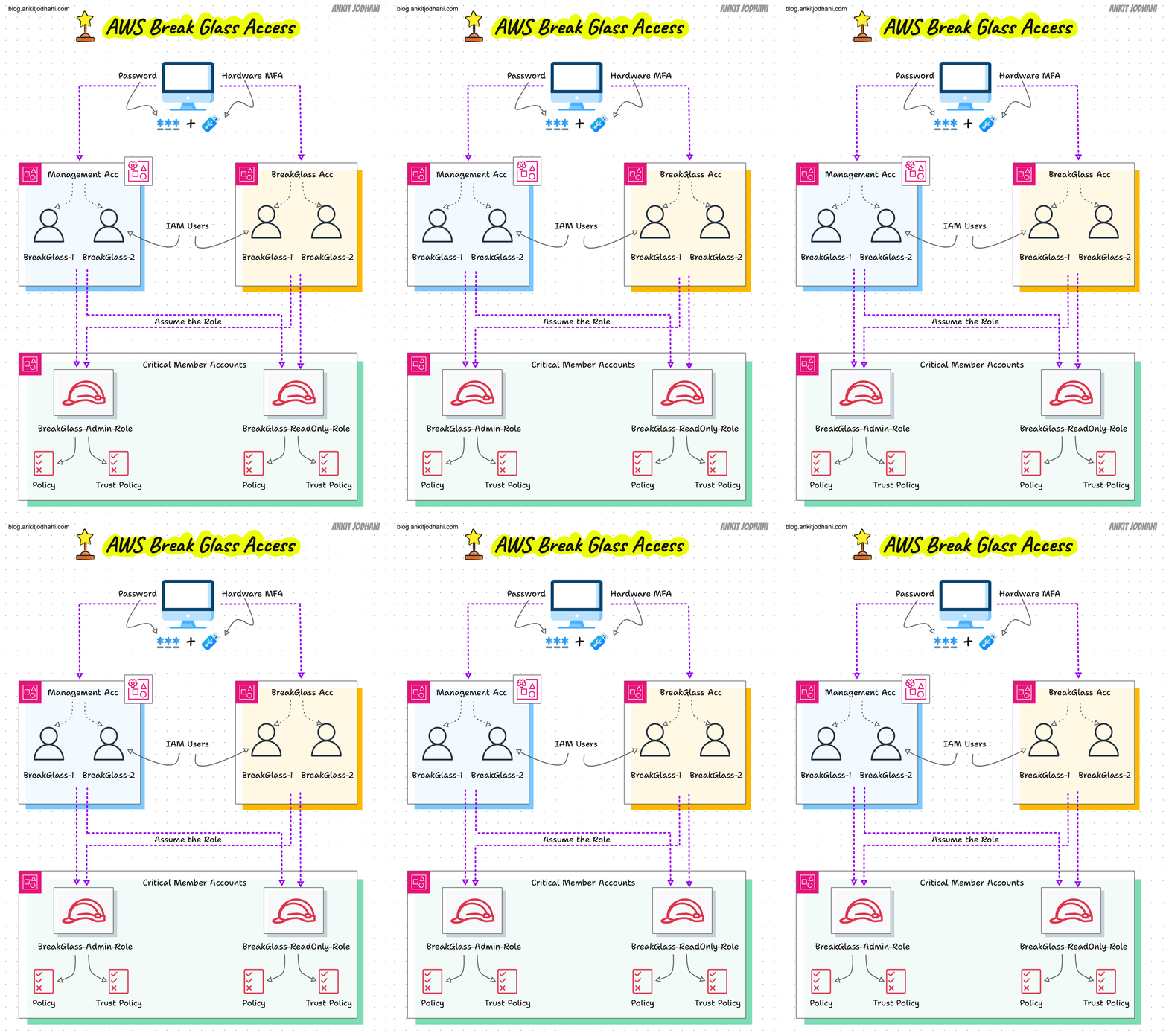
Here's what the architecture looks like:
- Break Glass Account: A separate dedicated account in dedicated OU or in the Security OU with 2 IAM users (
BreakGlass-Admin-1andBreakGlass-Admin-2) - Management Account: Has 2 Break Glass IAM users (
BreakGlass-1andBreakGlass-2) along with the secured root user. - Every critical member account(not every): Has 2 IAM roles (
BreakGlassReadOnlyandBreakGlassAdmin)- These roles trust all 4 Break Glass users (2 from Management + 2 from Break Glass Account)
- They require MFA for assumption
- The Break Glass Account has NO SSO access (it should be completely independent or disconnected from Identity Center - no one should have access to it)
- The Break Glass Account has NO workloads (only CloudTrail and Config running)
- CloudTrail + EventBridge alerts fire whenever any Break Glass user logs in or assumes a role
The key idea here: we have 3 layers of emergency access, each independent of the other:
Layer 1: Break Glass Account IAM Users
         (handles most common emergencies or used when Management Account itself is compromised or broken)

Layer 2: Break Glass IAM Users in Management Account
         (handles emergencies like SSO fix, SCP fix)

Layer 3: Management Account Root User
         (absolute last resort, when everything else fails)
🚀 Step-by-Step Implementation Guide
🔹 Step 1: Create the Break Glass AWS Account
Create a new AWS account through Account Factory or AWS Organizations.
- Account Name:
BreakGlass - Root Email:
aws-breakglass@xyz.com(dedicated email, not shared with anyone else) - OU Placement: Security OU (or create a dedicated sub-OU)
Few critical things about this account:
- This account must be disconnected from SSO / Identity Center (no one should be able to access it via SSO)
- No workloads should run in this account (only CloudTrail and AWS Config, which are mandatory via Control Tower)
- The SCPs on this account's OU should NOT block
sts:AssumeRoleoriam:*otherwise the Break Glass users won't be able to assume roles in other accounts
🔹 Step 2: Create Break Glass IAM Users in the Break Glass Account
In the newly created Break Glass Account, create 2 IAM users with console access:
BreakGlass-Admin-1BreakGlass-Admin-2
For each user:
- a) Create the user with console access
- b) Attach the permission to assume roles in other accounts
{
  "Version": "2012-10-17",
  "Statement": [
    {
      "Sid": "AllowAssumeBreakGlassRoles",
      "Effect": "Allow",
      "Action": "sts:AssumeRole",
      "Resource": [
        "arn:aws:iam::*:role/BreakGlassAdmin",
        "arn:aws:iam::*:role/BreakGlassReadOnly"
      ]
    }
  ]
}
- c) Add an MFA enforcement policy:
- This is important: Even if someone gets the password, they can't do anything without the hardware MFA device.
{
  "Version": "2012-10-17",
  "Statement": [
    {
      "Sid": "DenyAllWithoutMFA",
      "Effect": "Deny",
      "NotAction": [
        "iam:CreateVirtualMFADevice",
        "iam:EnableMFADevice",
        "iam:GetUser",
        "iam:ListMFADevices",
        "iam:ListVirtualMFADevices",
        "iam:ResyncMFADevice",
        "sts:GetSessionToken"
      ],
      "Resource": "*",
      "Condition": {
        "BoolIfExists": {
          "aws:MultiFactorAuthPresent": "false"
        }
      }
    }
  ]
}
- d) Setup Hardware MFA:
- Use a hardware MFA device (YubiKey or similar): NOT a phone-based authenticator app
- Register the MFA device on each user
- Label the physical device clearly:
BG-ADMIN-1-MFA
- e) Store the credentials securely:
- Store passwords in your organization's security vault (1Password Business, CyberArk, HashiCorp Vault, something that does NOT depend on AWS)
- Store the hardware MFA devices in a physical secure location (office safe, locked cabinet)
📛 Best practice: implement dual control. One person holds the password, another person holds the MFA device. Both must be present to use Break Glass. This prevents a single person from having unilateral access.
- These credentials should be shared with 2 credible people in your organization, typically the Cloud Platform Lead and the CTO
Now repeat the same for BreakGlass-Admin-2.
🔹 Step 3: Create Break Glass IAM Users in the Management Account
Now create 2 more Break Glass users, but this time in the Management Account:
BreakGlass-1BreakGlass-2
The setup is identical to Step 2, same policies, same MFA, same credential storage practices.
| Scenario | Break Glass Account Users | Management Account Users |
|---|---|---|
| Access member accounts when SSO is down | ✅ Works | ✅ Works (two paths) |
| Fix SCPs / AWS Organizations | ❌ Must use Management Account root | ✅ Use Break Glass IAM user (faster, better audit trail) |
| Fix IAM Identity Center (SSO) | ❌ Must use Management Account root | ✅ Use Break Glass IAM user |
| Fix Control Tower | ❌ Must use Management Account root | ✅ Use Break Glass IAM user |
Note: The Break Glass Account cannot manage Organizations, SCPs, or Identity Center, only the Management Account can. Without Break Glass users in the Management Account, every SCP or SSO issue forces you to use root. And root should be the absolute last resort..
🔹 Step 4: Create Cross-Account Roles in Every Member Account
- This is the critical piece that connects everything. In every critical member account, create 2 IAM roles:
- Role 1:
BreakGlassReadOnly: For investigation and read-only access
- Role 1:
{
  "RoleName": "BreakGlassReadOnly",
  "MaxSessionDuration": 14400,
  "AssumeRolePolicyDocument": {
    "Version": "2012-10-17",
    "Statement": [
      {
        "Sid": "TrustManagementAccountBreakGlass",
        "Effect": "Allow",
        "Principal": {
          "AWS": [
            "arn:aws:iam::MANAGEMENT_ACCOUNT_ID:user/BreakGlass-1",
            "arn:aws:iam::MANAGEMENT_ACCOUNT_ID:user/BreakGlass-2"
          ]
        },
        "Action": "sts:AssumeRole",
        "Condition": {
          "Bool": { "aws:MultiFactorAuthPresent": "true" }
        }
      },
      {
        "Sid": "TrustBreakGlassAccount",
        "Effect": "Allow",
        "Principal": {
          "AWS": [
            "arn:aws:iam::BREAKGLASS_ACCOUNT_ID:user/BreakGlass-Admin-1",
            "arn:aws:iam::BREAKGLASS_ACCOUNT_ID:user/BreakGlass-Admin-2"
          ]
        },
        "Action": "sts:AssumeRole",
        "Condition": {
          "Bool": { "aws:MultiFactorAuthPresent": "true" }
        }
      }
    ]
  },
  "ManagedPolicyArns": ["arn:aws:iam::aws:policy/ReadOnlyAccess"]
}
- Role 2:
BreakGlassAdmin: For full admin access when you need to fix things- Same trust policy as above, but attach
AdministratorAccessinstead ofReadOnlyAccess.
- Same trust policy as above, but attach
🔹 Step 5: Setup Alerts and Monitoring
This is non-negotiable. You MUST know when anyone uses Break Glass. whether it's a legitimate emergency or an attacker who got hold of the credentials.
What to alert on:
- Any console login by Break Glass IAM users
- Any
sts:AssumeRolecall toBreakGlassAdminorBreakGlassReadOnlyroles - Any console login by root user (any account)
- Any failed login attempts on Break Glass users
Send notifications to:
- 📧 Email: Security team + Cloud Platform Lead
- 💬 Slack/Teams:
#security-alertschannel - 🚨 PagerDuty: High urgency (Break Glass login = always high urgency)
🔥 Emergency Procedure: How to Actually Use Break Glass
- There should be a complete documented procedure for how to use Break Glass and it should be easily accessible to your team in case of emergency.
Here's the exact flow:
STEP 0: Declare the emergency
  → Cloud Lead or CTO approves Break Glass usage
  → Notify #incident channel: "Break Glass initiated. Reason: [XYZ]"

STEP 1: Determine which layer you need
  → Need to fix SCPs / SSO / Control Tower?
    → Use BreakGlass-1 in Management Account
  → Management Account is compromised/broken?
    → Use BreakGlass-Admin-1 in Break Glass Account
  → Everything else has failed?
    → Use Management Account Root (Layer 3)

STEP 2: Retrieve credentials
  → Person A retrieves password from the vault
  → Person B retrieves hardware MFA device from secure storage
  → Both people must be present

STEP 3: Login
  → Go to: https://ACCOUNT_ID.signin.aws.amazon.com/console
  → Enter IAM username + password + MFA code
  → You're in.

STEP 4: If you need to reach a member account
  → Click username (top-right) → "Switch Role"
  → Enter target Account ID + Role (BreakGlassAdmin or BreakGlassReadOnly)
  → You're now inside the target account

STEP 5: Fix the issue
  → Document EVERY action you take (timestamps + what you did + why)

STEP 6: Exit and secure
  → Log out. Return MFA devices to storage.
  → Notify team: "Break Glass session ended. Normal access restored."

STEP 7: Post-incident
  → Rotate the Break Glass password that was used
  → Review CloudTrail logs for the session
  → Write incident report
  → Conduct post-mortem: Why was Break Glass needed? How to prevent it?
🧪 Break Glass Drill
- As discussed earlier, Break Glass mechanism must remain functional at all times. so for that, you should conduct a Break Glass drill every 6 months(or based on your schedule)
- Drill checklist:
- 🔘 Notify security team that a drill is starting
- 🔘 Retrieve Break Glass credentials from vault
- 🔘 Successfully log in as Break Glass user
- 🔘 Successfully switch role into a non-production member account
- 🔘 Verify alerts fired (security team confirms receipt)
- 🔘 Log out and return credentials
- 🔘 Rotate the password used during the drill
- 🔘 Document results, what worked, what didn't
- 🔘 Update the runbook if anything was unclear
🎬 Real-World Scenario: SSO is Down, Production is on Fire
- Let me paint you a real picture of how all of this comes together:
2:00 AM — PagerDuty fires. Payment service returning 500 errors.

2:02 AM — On-call SRE tries SSO portal. "Service Unavailable."
          Can't access any AWS account.

2:05 AM — SRE escalates to Cloud Lead: "SSO is down. Need Break Glass."

2:07 AM — Cloud Lead approves. Opens 1Password (SaaS — not on AWS).
          Retrieves BreakGlass-1 password. Grabs YubiKey from drawer.

2:10 AM — Logs into Management Account:
          https://111111111111.signin.aws.amazon.com/console
          Username: BreakGlass-1 | Password: *** | MFA: YubiKey

2:11 AM — Switches Role to Production Account:
          Account: 222222222222 | Role: BreakGlassAdmin

2:13 AM — Inside Production Account. Investigates the issue.
          Finds bad deployment. Initiates rollback.

2:20 AM — Application recovers. 500 errors stop.

2:22 AM — Logs out. Returns YubiKey to secure storage.

2:25 AM — Posts in #incident: "Production restored. Break Glass ended."

Next morning:
  → Security team reviews CloudTrail logs
  → BreakGlass-1 password rotated
  → Incident report written
  → Post-mortem: Why did SSO go down? How to prevent it?
🙌 Conclusion
Break Glass is one of those things that you set up hoping you'll never use it. But when you do need it, you'll be incredibly glad it's there.
I tried to cover all the important details and best practices. But writing everything in one blog is obviously not possible.
And that's a wrap! 🙌🥂
if you like my work please message me on LinkedIn with "Hi + your country name"
- 🙋♂️ Ankit Jodhani (Again, I'm open for Kubernetes, Cloud and DevOps Project)
📨 reach me at ankitjodhani1903@gmail.com